KPIs
KPIs are part of the enterprise edition. A community build serves no KPI endpoints, runs no evaluation worker and creates no KPI tables, so nothing on this page is reachable on one.
A KPI is a named metric with a target, thresholds, an owner, and a cadence. Veodyn evaluates it on schedule from a saved query, keeps its history, and can arm an alert on its breach threshold. KPIs live in Library → KPIs.
The KPI list
One list, no tabs. Each row shows a star, the name, a Status badge, the current Value, a Data badge, the Owner and the Domain, which reads Uncategorized when the KPI has none. Everything but the star and the Data badge sorts.
A bell beside a name means a breach alert is armed on that KPI.
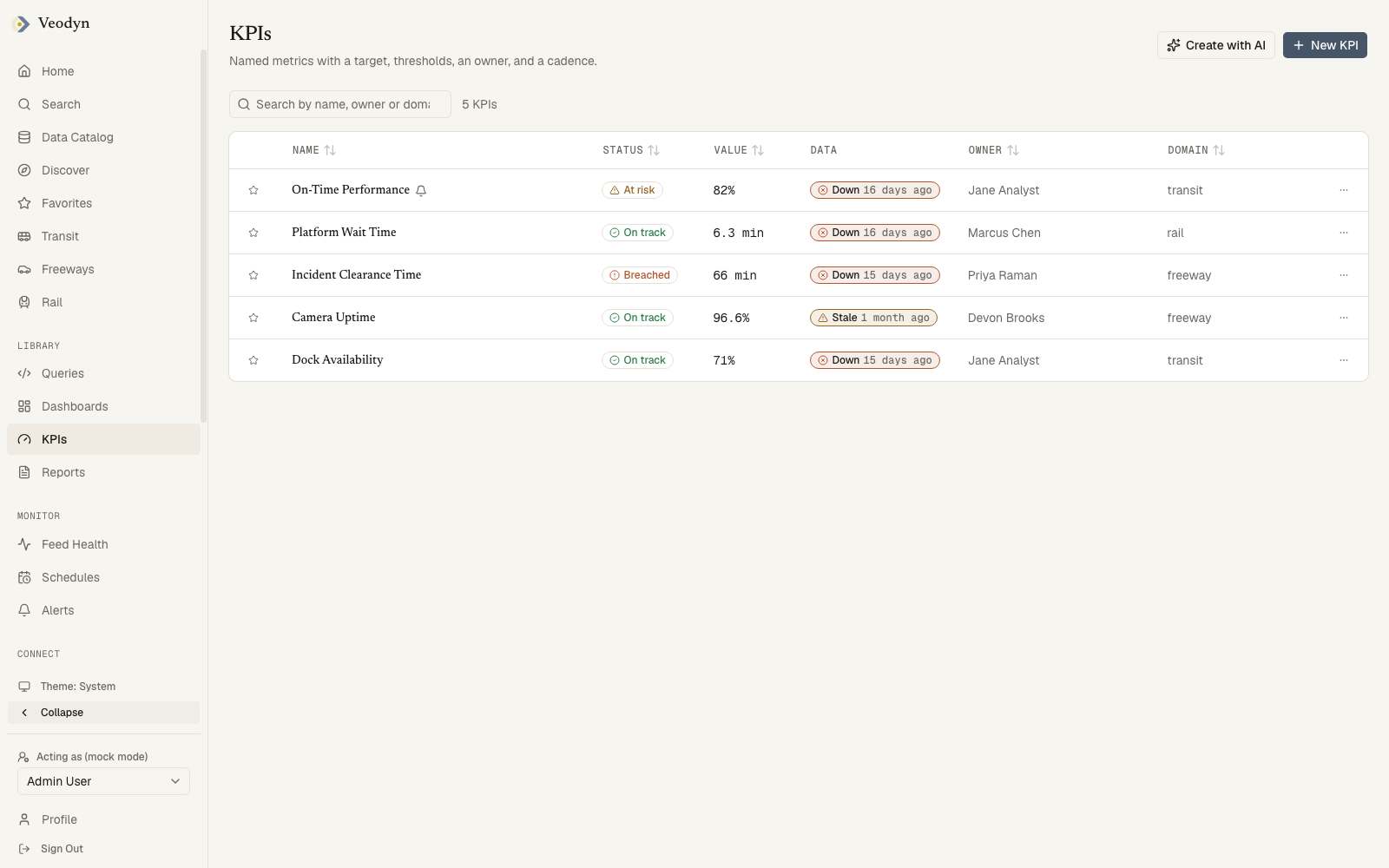
Two columns that answer different questions
Status and Data sit next to each other on purpose, and reading only one of them is how a dead feed goes unnoticed.
| Column | Answers |
|---|---|
| Status | Is this number good? On track, At risk, or Breached against the KPI's own thresholds |
| Data | Is there a number at all? How old the data underneath it is |
A KPI on a frozen feed keeps recomputing on schedule and keeps reporting On track, because the last value it managed to read is still within its thresholds. Only the Data column shows that nothing new has arrived. That combination, On track beside a stale badge, is the one worth stopping at.
Finding one
The search box matches name, owner and domain at once, so typing rail finds both a KPI named "Rail feed capture rate" and every KPI in the rail domain, whatever it is called.
The row menu holds Delete, for the KPI's owner or an admin, and appears only for them.
Header buttons: New KPI, and Create with AI when AI is enabled.
When the list is empty
Three different situations, three different messages: Unable to load KPIs. The KPI service may be unavailable. when the backend cannot be reached, No KPIs yet. on an instance where none has been defined, and No KPI matches that search when your search excluded them all.
Defining a KPI
New KPI is one form in three sections.
Details: name, owner, domain, description, unit, and cadence (Hourly / Daily / Weekly). Name and owner are required; the rest are not, and a KPI with no domain lists as Uncategorized.
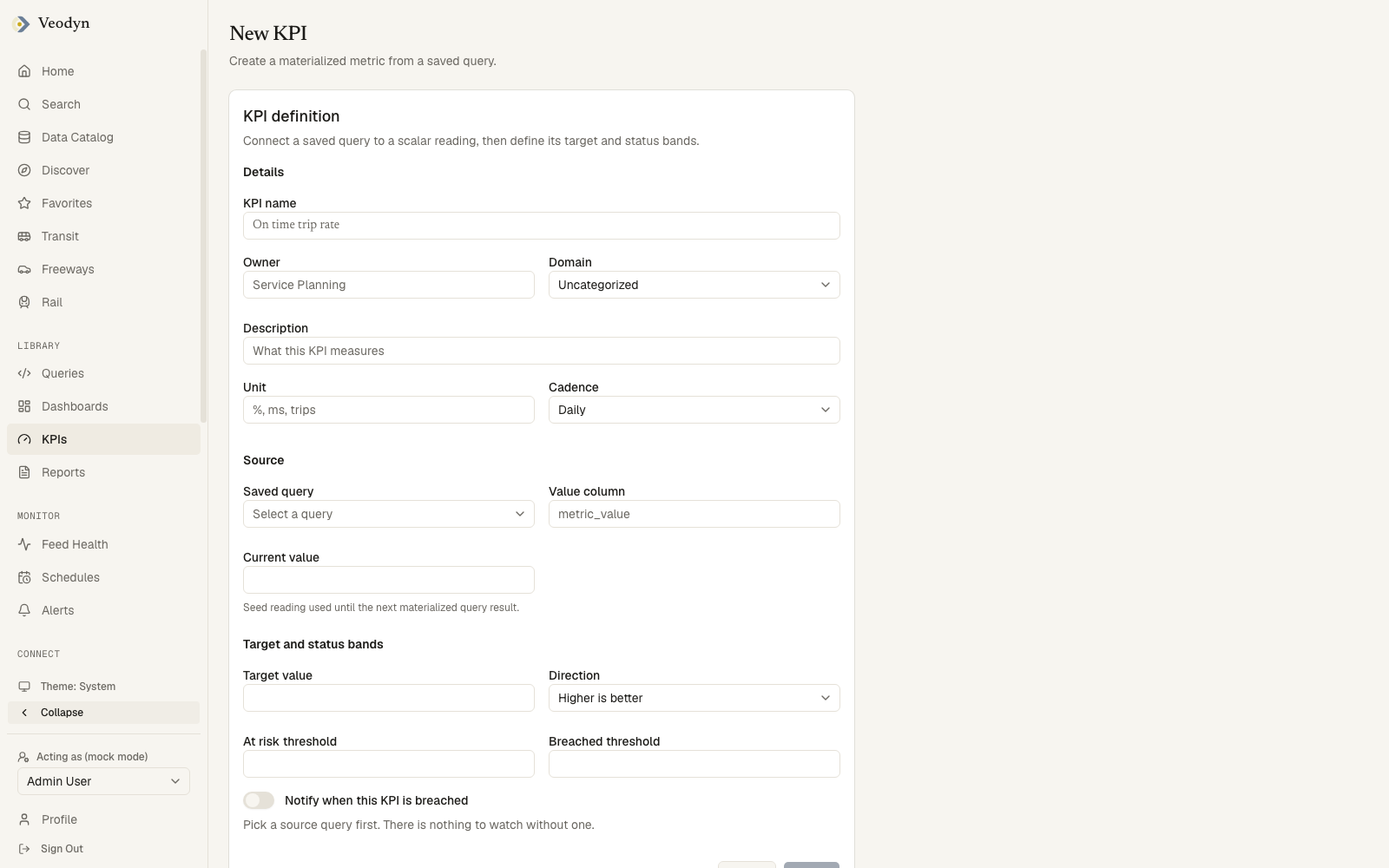
Source: the saved query that computes the metric, and which of its columns holds the number.
Target and status bands: the target value, the Direction, the At risk threshold, the Breached threshold, and the Notify when this KPI is breached toggle.
You do not type the current value
The Current value area explains itself: Measured, not entered. The first reading arrives on the next scheduled evaluation, usually within a minute. A KPI's value is whatever its query returns on the next tick, so there is nothing to fill in. Asking an author to type one would be asking them to state a measurement they have not taken.
The thresholds have to be in order
Direction decides which order is correct, and the form says so the moment the two disagree:
| Direction | Rule |
|---|---|
| Higher is better | At risk must be above breached |
| Lower is better | At risk must be below breached |
Get it backwards and both fields are outlined with For higher is better, the at risk threshold must be above the breached threshold. Create stays unavailable until it is right, along with a name, an owner, a source query, a value column, and all three numbers.
Why the alert toggle is sometimes off
The Notify when this KPI is breached toggle disables itself when arming could not work, and always says which reason applies:
| Reason | What to do |
|---|---|
| Pick a source query first. There is nothing to watch without one. | Choose the query |
| Pick a value column first. That is the number the alert compares. | Choose the column |
| This query could not be read... | It may be deleted, or not visible to you |
| This query is archived, so an alert on it could never fire. | Use a live query |
| Alerts do not work with parameterized queries: no parameter values reach the scheduled run. | Alert on an unparameterized query |
Each mirrors a refusal the backend would make anyway, so the form never offers a switch the save would reject.
If the save fails you stay on the form with the reason, rather than landing on a list that never received the KPI.
The notify toggle arms a real alert whose condition follows the KPI's breached threshold. Recipients are added on the alert itself once it exists.
Reading a KPI
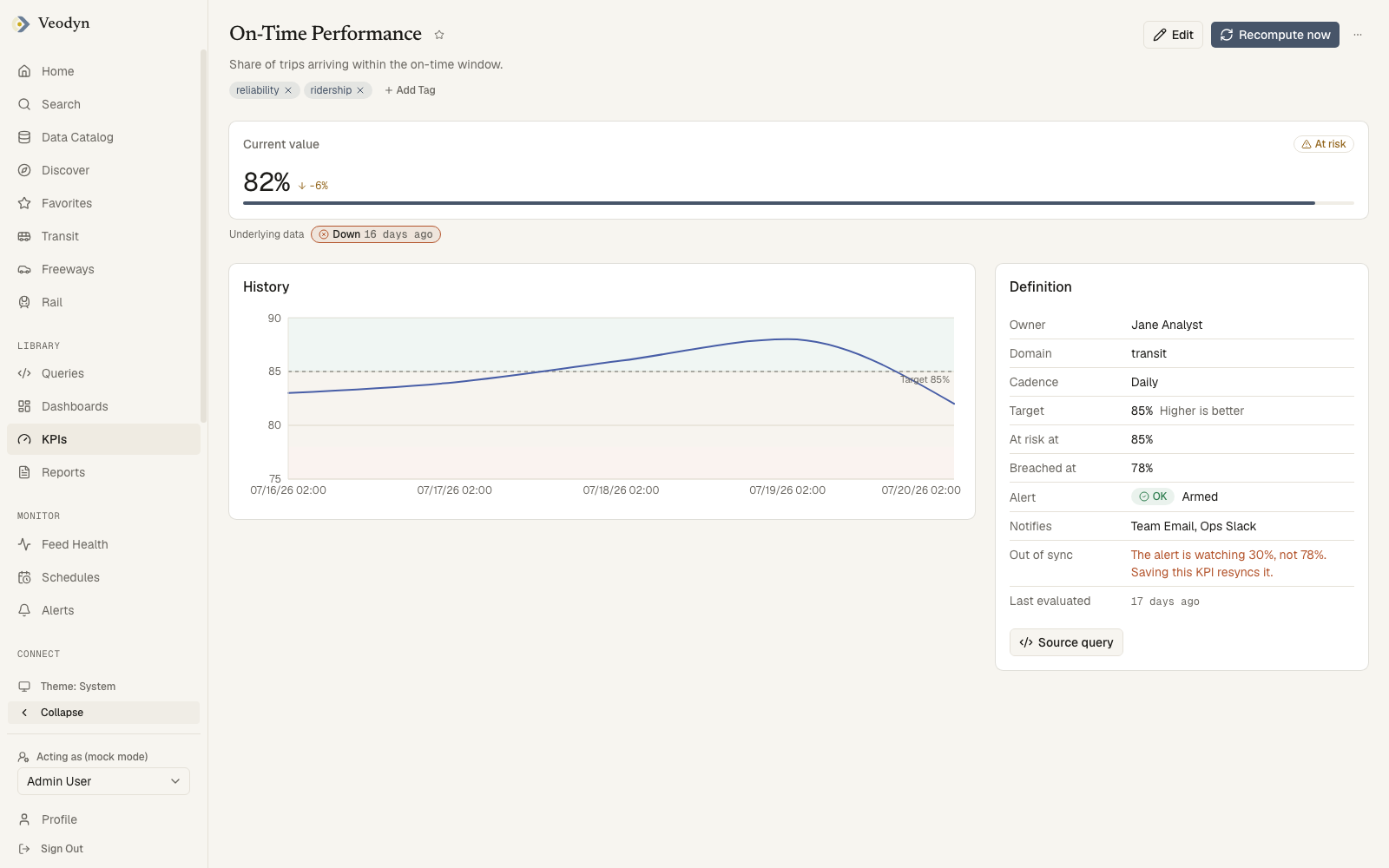
Three panels: the current value, its history, and its definition.
The scorecard leads with the value and its unit, the change since the previous reading, and a status badge. Directly beneath it, outside the card, sits the age of the underlying data.
Those two are deliberately separate, and it is the same distinction the list's Status and Data columns make. The card's own timestamp describes the evaluation, and a KPI on a dead feed goes on evaluating punctually forever. The line below it describes the data that evaluation read.
The History chart draws the value over time with the target line and the at-risk and breached bands behind it, so a number drifting toward a threshold is visible before it crosses.
The Definition card
| Row | Holds |
|---|---|
| Owner, Domain, Cadence | Who owns it, its subject, how often it evaluates |
| Target | The target value and the direction, Higher is better or Lower is better |
| At risk at, Breached at | The two thresholds |
| Alert | Armed with the alert's current state, or Not armed |
| Notifies | Where a breach goes, for example you by email |
| Last evaluated | When the metric last ran |
Source query at the bottom opens the query that computes the number. That button is the fastest way to answer "where does this figure actually come from", and worth reaching for before concluding a KPI disagrees with something else on screen.
Acting on it
Recompute now forces an evaluation outside the cadence and reports either way. Edit reopens the form. The overflow menu holds Delete, for the owner or an admin only, and returns you to the list afterwards.
Tags are editable by the KPI's owner or an admin, and read-only for everyone else.
A KPI id that does not exist says KPI not found, and a KPI service that cannot be reached says so instead of showing an empty page.
Editing a KPI
Edit reopens the same form with everything filled in, titled Edit <name> and saving with Save instead of Create. A save that fails leaves you on the form with the reason, rather than returning you to a detail page still showing the old definition.
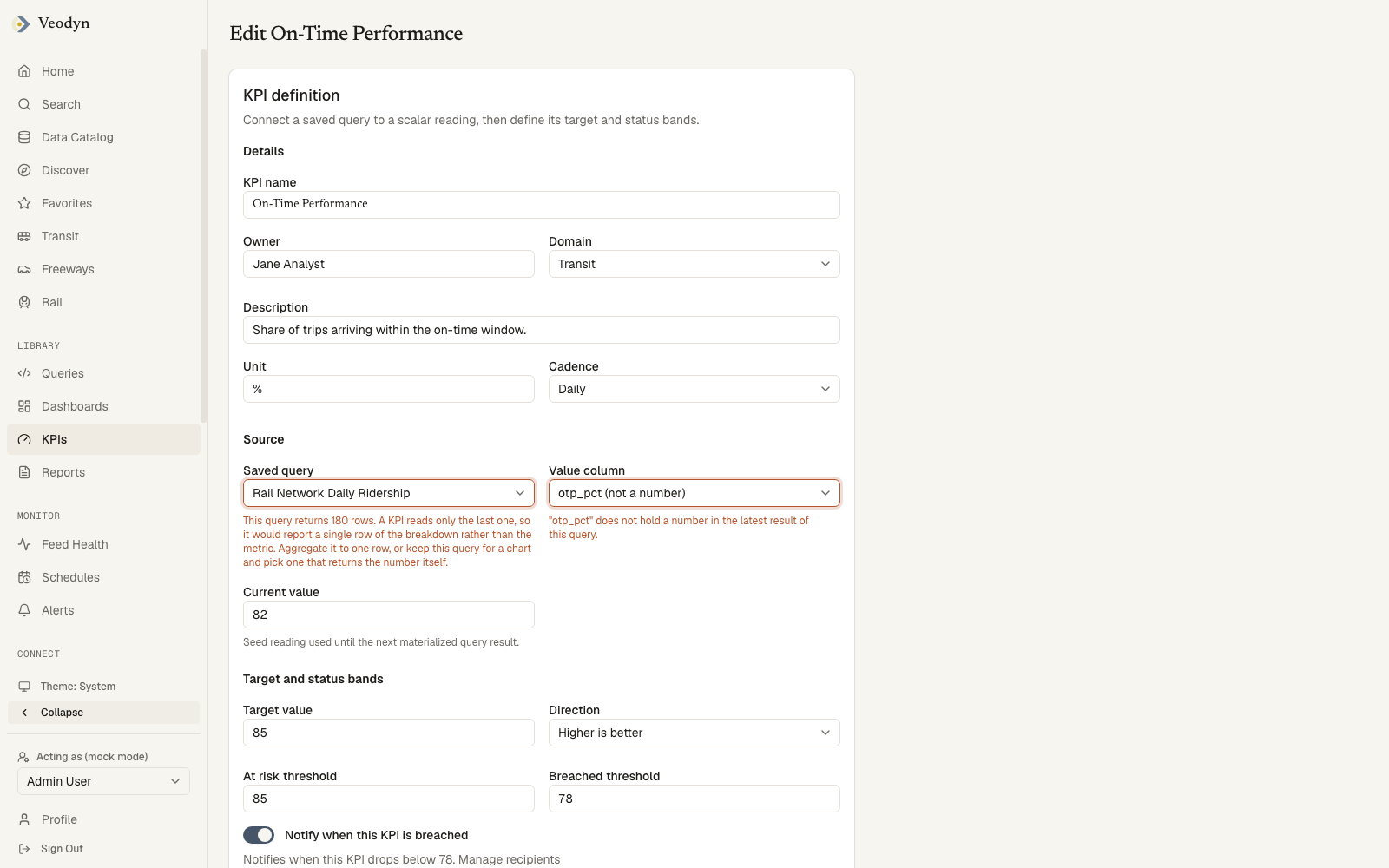
If you change the source query or the value column, the KPI's stored readings are thrown away, and the form warns you first, naming how many will go. They measured the previous metric, so keeping them beside readings of a different number would make the History chart a comparison of two unrelated things. A fresh reading arrives on the next evaluation.
Only the KPI's owner or an admin can save changes. The Edit button is offered more widely than that, so if you do not own a KPI you may get as far as the form and be refused at the last step.
How evaluation works
KPI evaluations run on the sidecar's worker as a dedicated service account (a scheduled job has no user to borrow credentials from), on the cadence you set, with backoff after repeated failures. The history the chart draws is the record of those evaluations.
KPIs are served by the veodyn-api sidecar; on an instance without it, the KPI screens run on demo fixtures.