Visualization Plugins
Plugins are how an instance ships custom visualization types without forking Veodyn. The stock build contains only the 15 neutral core types; anything tenant-specific (a station camera slider, a departure board for a lobby screen) lives in a plugin package that a tenant's image compiles in. The core product stays a clean open-source build, and a core upgrade never has to merge around customer code.
A plugin registers one object into the same registry the core types use. Once registered, it needs no per-surface wiring: the type selector, dashboards, reports, the problems panel, and the renderer all dispatch through the registry.
What a plugin can be
A plugin is code that draws something inside a visualization slot. It may:
- read the rows of the query it hangs off (the normal case),
- fetch an external feed itself from the browser (a camera image URL that arrived in a query result),
- call the instance's own same-origin API,
- or draw from no data at all. A plugin can declare
needs: 'none', and every render surface stops waiting for a query result before mounting it. A decorative wall backdrop is a legitimate plugin.
Each plugin also declares an audience: analyst types appear in the New Visualization type selector; internal types can only be placed by configuration or existing saved objects (scenery for a wall screen, not an analysis tool). Either can be overridden per instance.
The reference package, example, ships one plugin: a Hello Panel (EXAMPLE_HELLO_PANEL) that draws from no data at all (needs: 'none'), so it demonstrates the registration seam without a real data source in the way.
How an instance enables plugins
Plugins are compiled in at build time, not loaded at runtime:
docker build --build-arg NEXT_PUBLIC_VEODYN_PLUGINS=example app/
NEXT_PUBLIC_VEODYN_PLUGINS is a comma-separated list of package names from the static map in src/plugins/index.ts. It must be set when the image is built, because the bundler has to see the import; setting it on a running pod cannot add plugins to an image built without them. A name the build does not contain warns and is skipped rather than failing the boot.
Runtime module loading was considered and deliberately rejected: it fights server rendering, introduces version skew between host and plugin, and needs a signing infrastructure before loading third-party code into the app origin is safe. Adding a visualization means building an image.
Two instance config keys then govern what users see. They compose rather than override:
visualizations:
  enabled: [TABLE, CHART, COUNTER, MAP, EXAMPLE_HELLO_PANEL]  # does the type exist here at all
  audience:
    EXAMPLE_HELLO_PANEL: internal   # who is offered it, overriding the plugin's own declaration
Disabling a type controls creation only: a widget saved with a type you later drop still renders, so turning a type off never blanks existing dashboards.
A tenant pack supplies its own package the same way: a directory under src/plugins/ with the same VisualizationPlugin shape the example package uses, added to the static map, and named in NEXT_PUBLIC_VEODYN_PLUGINS for that tenant's image build. The pack is overlaid onto the tree at build time rather than shipped inside this repository, so a tenant's visualizations never enter the open-source build and a core upgrade never has to merge around them.
Verifying what registered
Admin → Plugins reads the live registry, not a build manifest, so it reports what actually registered in the running image: each visualization's type, plugin API version, what data it reads, its effective audience (marked when config overrode it), and whether it currently appears in the picker. A plugin that ships in an image but was never imported would show up missing here, which is exactly the failure the page exists to catch.
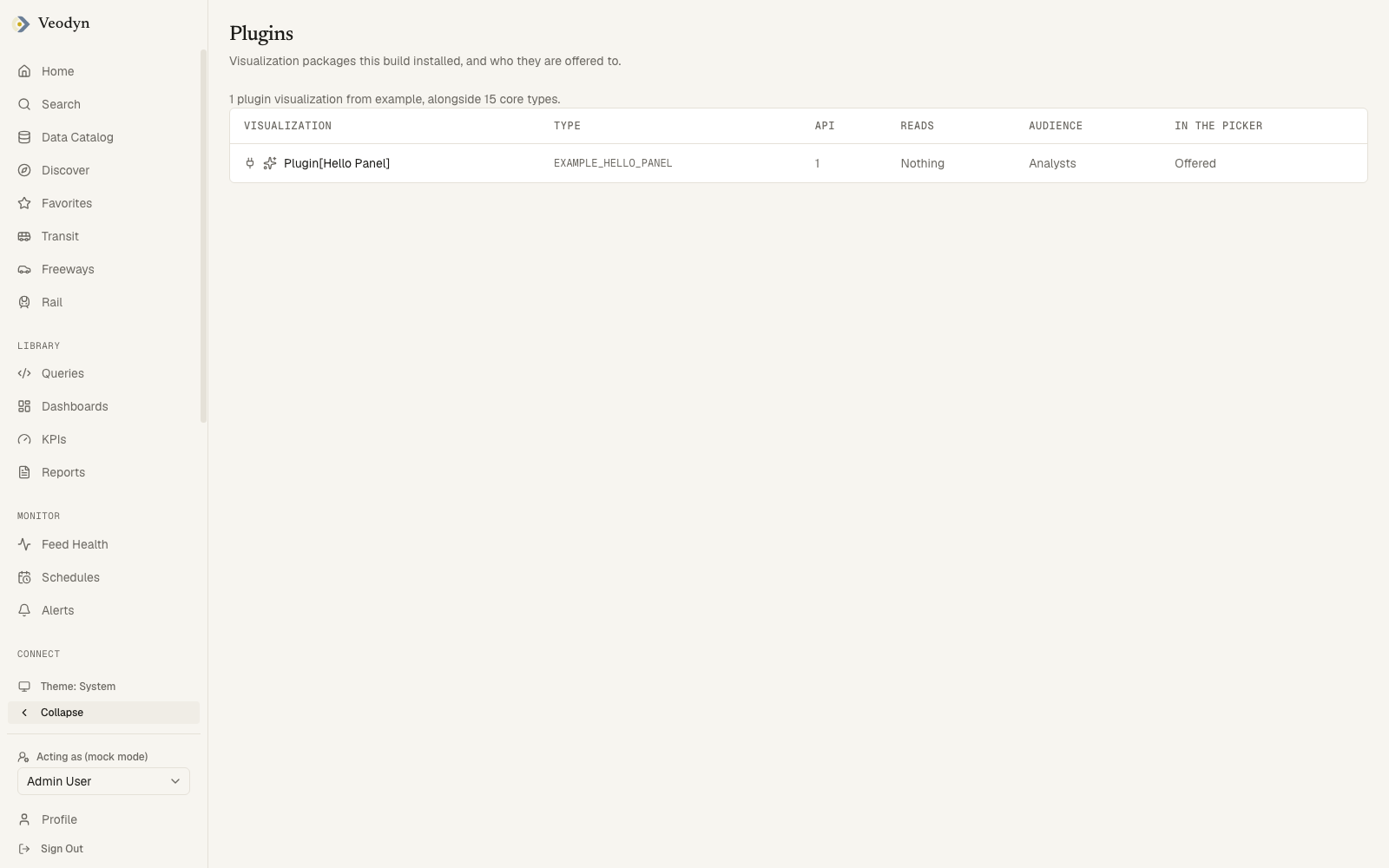
The capture is a stock build with the example package installed, which is why it lists one row. An image with a tenant pack overlaid on it would list that pack's types here too, and nothing else about the page would differ.
In lists where plugin types sit beside core types, they read as Plugin[Hello Panel] behind a plug icon, so an analyst can tell tenant additions from the product's own set. The Visual builder's thumbnail grid stays core-only; plugin types are created through the type selector.
The plugin interface
A plugin is one TypeScript object (src/lib/visualizations/plugin.ts):
| Field | Purpose |
|---|---|
apiVersion | Must equal the host's PLUGIN_API_VERSION (an integer). A mismatch fails at registration with both numbers named, so an outdated plugin is one log line at boot instead of a blank widget at render |
type | Stable and unique; matches the query service's visualization type column. A duplicate registration throws, so a plugin cannot silently shadow a core type |
displayName, icon, thumbnail | How the type presents in pickers |
defaultOptions | The options a new visualization starts from |
needs | 'query-result' (default) or 'none' |
audience | 'analyst' (default) or 'internal' |
Renderer | The component that draws, given the visualization, its data, and any annotations |
Editor | The options panel in the edit dialog; omit for a type with nothing to configure |
inferOptions | Seeds options from the shape of a real result when the type is first chosen |
validate | Reports why the visualization cannot draw ("the mapped column is gone") instead of rendering blank; surfaced in the editor and beside the rendered widget |
publicOptions | Which option keys survive into a public report or embed. Options are rebuilt key by key from this schema; anything undeclared is dropped. Omit it and the type publishes nothing, which is safe but renders unconfigured for anonymous readers |
validate exists because of a real failure class: a chart whose mapped column stops coming back from the data source used to draw axes and nothing, silently. publicOptions exists because anonymous readers fetch report payloads, and an options bag in the wild carries whatever an author or an old backend left in it; declaring keys beside the renderer keeps "what renders" and "what publishes" from drifting.
Rules a plugin package follows
Plugins are first-party code: written for the instance, reviewed, and compiled in. There is no sandbox, and the review is the control. Three rules are enforced or firm regardless:
- The import boundary. A test walks every package under
src/plugins/and fails on imports outside the allowed set (React, the plugin API, theui/primitives, the map library, and the package's own files). In particular, nothing under the product'scomponents/visualizationsmay be reached, even dynamically: a plugin that imports product internals turns every product change into a plugin-breaking change. - No credentials. Backends stay server-only. A plugin may fetch a URL that arrived in a query result (the query ran server-side, so the URL is already scoped), but it must not hold an API key or call a configured backend directly. Anything needing a secret belongs in a route handler.
- Treat fetched URLs as untrusted input. They came from a data source. No injected HTML, and failures degrade instead of throwing; a camera feed where most URLs 404 should look calm, not broken.
Practical notes for authors: use a plain <img> and fetch rather than next/image (whose remote-host allowlist would force every instance to edit next.config.ts), and register the package from a module both the browser and server graphs import, or public-report sanitization will not see the plugin's publicOptions.
Two decisions behind this shape are worth stating, because they are the ones authors most often expect to go the other way. Plugins are resolved at build time, not loaded at runtime: a runtime loader would mean executing third-party code fetched by a running deployment, and the import boundary above could then only be advisory. And there is no in-app authoring surface: a plugin is a package in the build, reviewed like any other dependency, rather than something a signed-in user can introduce into everyone else's session.